

Family Friendly
Totally clean Never Have I Ever for mixed ages and family nights.
Sneak peek
- Never have I ever gotten lost in a supermarket Easy
- Never have I ever worn my shirt inside out all day without noticing Easy
- Never have I ever had my parents show up unannounced to my apartment Family Medium
- Never have I ever skipped a family video call and lied about why Family Medium
Answers stay hidden — no spoilers for your crew.
Difficulty mix
How to play
- A statement appears: "Never have I ever…". Answer privately on your phone — 🙋 I have, or 🙅 I never.
- Guess the room: also predict how many people at the table HAVE (yourself included). Exact guess +100, off by one +50.
- Nobody sees anyone's answer until the reveal. The host can hide names so only the count is shown.
- Classic rule: if you have, take a sip (or don't — soft drinks welcome). It's always optional; nobody has to explain anything.
- With Guess the room off there's no scoring (unless Brave points are on: +10 for every "I have") — just play for the stories.
About Family Friendly
Family Friendly is a Never Have I Ever pack with 71 prompts covering icebreaker, rated PG (family friendly). Totally clean Never Have I Ever for mixed ages and family nights.
The difficulty mix is 58% easy and 42% medium, so it suits mixed crowds, office parties and first-timers.
It is one of the newer packs in the library — be the first table to take it on.
More Never Have I Ever packs you might like
General Knowledge →Play Family Friendly in three steps
-
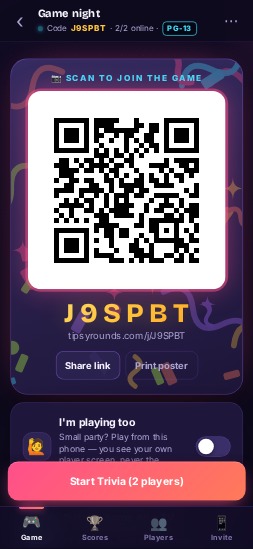 1
1Open a game night
Pick a pack on your phone — a QR code appears.
-
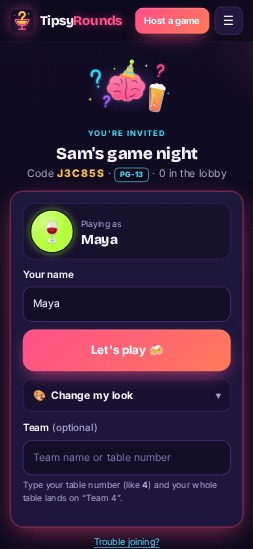 2
2Everyone scans
Friends scan the QR code (or type the game code at tipsyrounds.com) and pick a name. No app, no sign-up.
-
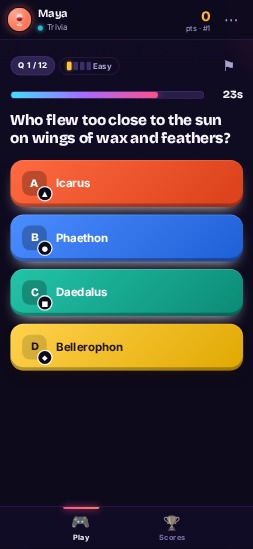 3
3Play & keep score
Questions pop up on every phone; scores update live.


FAQ
How do I play Family Friendly at a bar or party?
Tap “Play this pack”, then put the QR code where everyone can see it (on your phone, a printout or a TV). Players scan it with their phone camera and answer on their own phones — no app, no sign-up. TipsyRounds runs the timer, reveals the answers and keeps score.
How many prompts are in Family Friendly?
71 prompts.
Is it free?
Yes. Hosting, every game and every pack are free, and players never pay or sign up.